
Historical data map search
Help
Layers
Change the visual style of the map.
Basemap
| Layer | Description |
|---|---|
| Transportation | Displays major highways, roads, and transportation routes. |
| Simple | A minimal background that removes nonessential visual details. |
| City names | Shows city names. Search based on urban geography or identify stations near familiar places. |
Markers
| Tool | Description |
|---|---|
| Alternative colour palette | Displays station markers using an alternative colour palette to improve visual distinction for users with colour vision deficiencies. |
Map tools
Select one or more stations by drawing shapes. Find proximity and measure distances between points of interest on the map.
| Tool | Description |
|---|---|
| Rectangle | Click-hold on the map to draw a rectangle and select multiple stations. |
| Polygon | Click-hold on the map to draw an irregular, multi-side shape and select multiple stations. Close the shape to activate. Click outside the shape to release. |
| Proximity |
Filters by stations within a specific radius of a selected point. Activates by entering a distance between 0.1 and 200 kilometres (km) and then clicking on a focal point on the map. Note: Map displays are approximate. |
| Measure |
Measures distance between points on the map. Activates with a click‑to‑click action between two points of interest. |
Data filters
Narrow down stations: Use filters for text, number, or category.
| Filter | Description |
|---|---|
|
|
Filters stations by status: active, inactive (not currently transmitting data), or both. |
| Search by station name. | |
|
Date range
|
Filters for stations with data available between two dates (start date and end date). |
|
Specific date
|
Filters for stations with data available on a specific date. |
|
|
Filters by data interval availability of data observation frequency. |
|
Province or territory
|
Select multiple stations for one, few, or all provinces and territories. |
|
Coordinates
|
Filter by specific latitudes and longitudes. |
|
Location
|
Zoom in to a location to identify stations around it. |
|
Filters for stations within a specific radius of a selected point. Note: Map displays are approximate. |
|
|
Elevation (m)
|
Filters stations by their elevation above sea level in metres. |
|
Climate ID
|
Filter by climate identifiers. |
|
Transport Canada (TC) ID
|
Filter by Transport Canada identifiers. |
|
Station operators
|
Filter stations by one or more station operators. |
| Clear all applied layers and filters. |
Map features
Display
| Feature | Description |
|---|---|
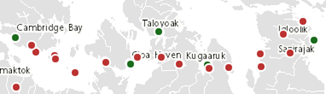 |
Each dot represents a station.
|
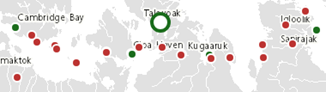 |
Click on the map to see highlighted station dots. Find the station information (metadata) in the Station results panel. |
Navigation
Use the Navigation controls in the bottom margin of the map to change the map view.
| Symbol | Description |
|---|---|
|
|
Zoom in for more detail |
|
|
Zoom out for less detail |
|
|
Enter full screen / Exit full screen |
|
|
Copyright information |
|
1000 km
|
Unit scale bar |
|
23.6436
N
, 146.6402
W
|
Live coordinates readout |
Pan the map: click-hold on the map and drag. Zoom in or out: hover over the map and use the mouse scroll wheel.
Station results
Shows all stations from applied filters or selections. Access data report pages and download search results.
| Object | Description |
|---|---|
|
Collapsed station card: TALOYOAK A
Expanded station card: TALOYOAK A
|
Expandable section that displays information (metadata) available for the station or a number of stations selected on the map. Metadata available: Station identifiers:
Full name of the province or territory Geopositional coordinates:
Organization responsible for the given station (listed where applicable) Data interval availability:
Note: Station's metadata and data availability are subject to availability in the National Climate Archive. |
| Click to access station's data report pages | |
| Click to download the results of a search in comma separated format | |
| Click to toggle the station results display format. Options include the station card display and tabular format. | |
| Click to scroll to the top of the Station results list |
Page details
- Date modified: